
AI Image Generators That Keep Characters Consistent

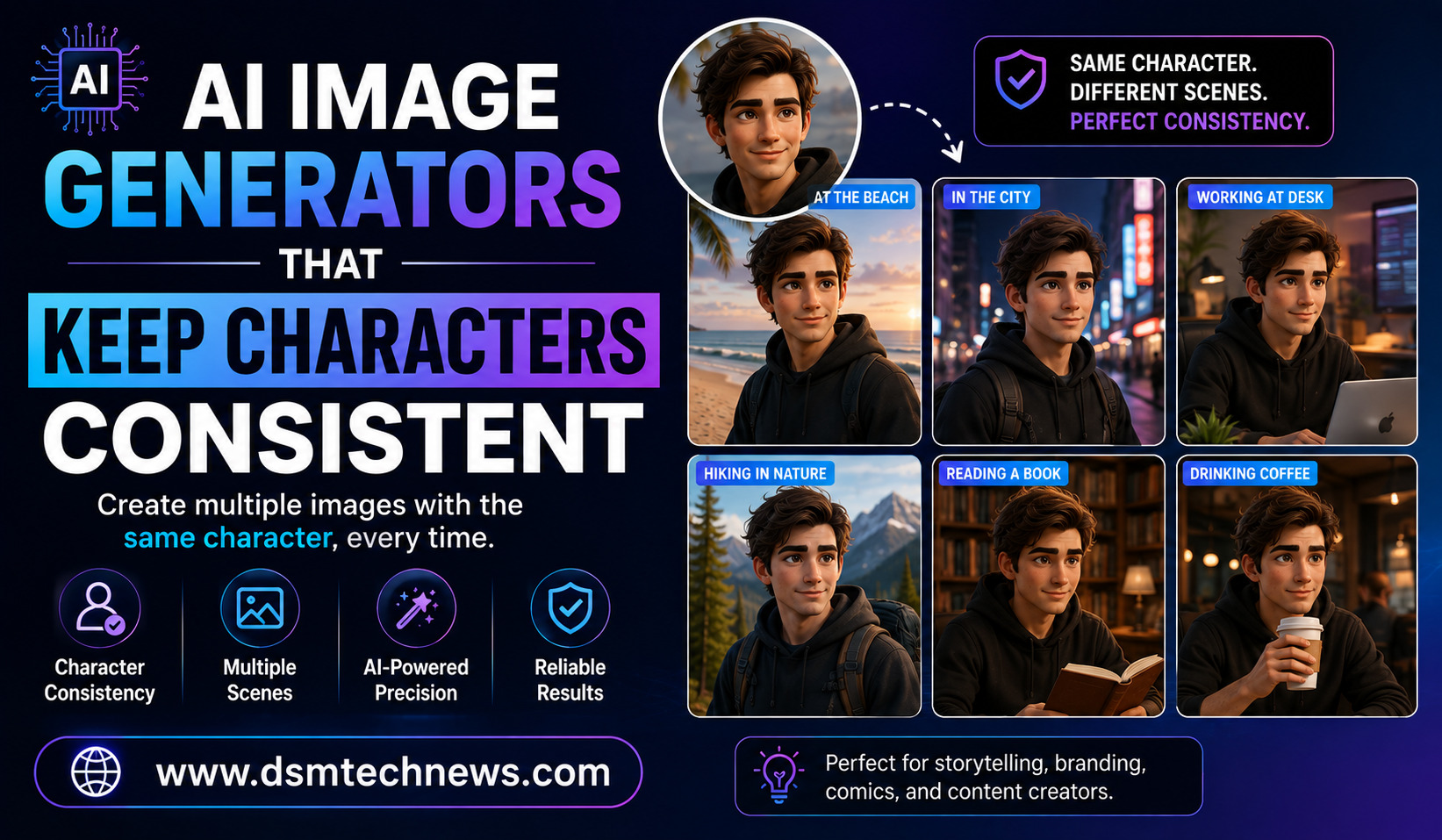
Creating one impressive AI-generated image is relatively easy today. The bigger challenge begins when you want the same character to appear consistently across multiple images.
A character may look perfect in the first generation, but in the next image their face can change, their hairstyle may be different, their clothing can suddenly shift, or their overall appearance may no longer match the original. This problem is commonly known as character drift, and it can be frustrating for anyone creating stories, comics, advertisements, children’s books, social media content, or branded visuals.
Fortunately, AI image generators have become much better at maintaining character identity. Many modern tools can use reference images to preserve important visual characteristics while changing the character’s pose, environment, clothing, lighting, or activity. Google, for example, says its latest Gemini image models can use character reference images to maintain consistency across generations.
This makes AI character generation far more useful for creators who need a recognizable person or fictional character to appear across an entire visual project.
What Is Character Consistency in AI Images?
Character consistency means keeping the same visual identity across multiple AI-generated images.
Imagine you create a fictional character named Maya. In the first image, Maya has short black hair, brown eyes, a round face, and a yellow jacket. If you generate another image showing Maya walking through a city, you want her to still look like Maya rather than becoming a completely different person.
A consistent character should retain recognizable facial features, hairstyle, body proportions, clothing details, accessories, and other defining characteristics while the scene itself changes.
This capability is particularly valuable for visual storytelling. A children’s storybook, for example, may require the same character to appear on dozens of pages. A comic creator may need the same hero in different locations and poses. A marketing team may want a fictional brand ambassador to appear throughout an advertising campaign.
Why Character Consistency Is Difficult
AI image generators traditionally create each image as a separate generation. Even when you provide the same description, the result can vary.
A prompt such as “young woman with brown hair wearing a red jacket” does not necessarily identify one unique person to the model. The system may create a different face every time.
Modern reference-based systems address this problem by allowing the model to use an existing image as a visual anchor. Instead of relying entirely on text, the AI can analyze the character’s appearance from the reference and attempt to preserve it.
Google’s current image-generation documentation specifically describes using multiple character reference images for maintaining character consistency, including support for up to five character images in Gemini 3 Pro Image.
Best AI Image Generators for Consistent Characters
Gemini Image Generation
Google’s Gemini image-generation models are among the strongest options for reference-based character workflows. The system allows creators to provide character reference images and then place those characters into new scenes.
Gemini’s current documentation describes character consistency workflows in which reference images can be reused while changing poses, environments, and other elements. It also supports iterative workflows for creating different views of the same character.
This makes Gemini particularly interesting for creators working on story illustrations, character sheets, marketing visuals, and multi-scene projects.
Google has also published guidance showing how a character can be extracted from an existing image and reused as a reference for generating a series of consistent illustrations.
Ideogram Character
Ideogram offers a dedicated character feature designed specifically around maintaining a character from a reference image.
Its official feature page describes a workflow where users upload one reference image and generate the character in different poses, outfits, and scenes. The platform also provides editing features that can help modify specific elements such as clothing, hair, and accessories.
This can make Ideogram useful for creators who want a relatively straightforward way to build a recurring character without setting up a complicated custom model.
OpenAI Image Generation
OpenAI’s image-generation tools can also work with uploaded reference images and iterative editing workflows. Rather than generating every scene independently, creators can provide previous images as references and give targeted instructions for subsequent changes.
OpenAI recommends using specific feedback and repeating important details when refining an image. Its guidance also explains that multiple uploaded images can be used to guide generation and that clear instructions about how the images relate to one another can improve the workflow.
This approach can be useful when you already have a character image and want to create variations while preserving important characteristics.
Midjourney
Midjourney is well known for producing visually attractive and highly stylized images. It can also be useful for character-focused projects when reference features are incorporated into the workflow.
For creators who care strongly about artistic style, Midjourney can be appealing because the same character concept can be developed across different environments while maintaining a recognizable visual direction.
However, character consistency is not simply about using the same prompt. Reference images and careful iteration are important when the character needs to remain recognizable over a large number of images.
FLUX-Based Workflows
FLUX-based image-generation workflows are another option for creators who want more control over character consistency. Depending on the implementation, these workflows can use reference images, image-to-image techniques, adapters, or custom-trained components.
This makes FLUX particularly interesting for advanced users who are comfortable with more technical AI image-generation setups.
For a creator who simply wants to produce a few consistent images, a simpler reference-based tool may be easier. For larger projects requiring repeatable results and greater control, more advanced workflows can become valuable.
Stable Diffusion
Stable Diffusion remains popular among technically experienced AI artists because it provides extensive customization possibilities.
Advanced users can create consistent characters using approaches such as LoRA training, reference-image systems, ControlNet, and other extensions. These methods require more setup than simple browser-based AI image generators, but they can provide significantly greater control.
A custom-trained character model can be especially useful when the same fictional character needs to appear across a large number of images.
How to Create a Consistent AI Character
The best results usually begin with a strong character reference.
Instead of creating a new character from scratch for every scene, generate a clear reference image first. Make sure the face, hairstyle, clothing, colors, and other important features are clearly visible.
You can then use this image as the foundation for future generations.
A useful prompt might say:
“Use the uploaded character as the primary visual reference. Preserve the character’s facial structure, hairstyle, eye color, clothing design, body proportions, and recognizable features. Place the same character in a busy modern city at sunset. Change only the environment and pose while keeping the character’s identity consistent.”
The important part is clearly separating the elements you want to change from the elements you want to preserve.
Character Sheets Can Improve Results
A character sheet can be extremely useful when building a long-term AI project.
Instead of relying on one portrait, create several views of the character. A front-facing portrait, side profile, full-body image, and different expressions can provide the AI with more information about the character.
Google’s current image-generation documentation describes using multiple reference images and generating different views iteratively to improve character consistency.
For a fictional character, you can also create a reference sheet showing their normal clothing, hairstyle, accessories, colors, and physical characteristics.
Once you have established the character, use that reference consistently rather than generating a completely new version every time.
Keep the Character Description Stable
Text prompts still matter even when you use reference images.
If your character is described as having short black hair, brown eyes, a green jacket, and a small silver necklace, keep those core details consistent unless you intentionally want to change them.
Changing the description dramatically from one image to another can introduce unnecessary variation.
At the same time, you should clearly state which elements can change. For example, you might tell the AI to keep the character’s face and hairstyle unchanged while changing the outfit and background.
Change One Major Element at a Time
Another useful technique is gradual editing.
Instead of changing the character, background, clothing, lighting, camera angle, and art style simultaneously, begin with the existing character and make one major modification.
You could first change the background. Then change the pose. Then modify the clothing. This makes it easier to identify what caused a consistency problem.
OpenAI’s image-generation guidance similarly recommends specific, actionable revisions and step-by-step refinement when editing images.
Character Consistency for Children’s Books
AI character consistency is particularly valuable for children’s books.
A story may require the same child, animal, superhero, or fantasy character to appear on every page. If the character looks different in each illustration, the story can feel visually disconnected.
A reference-based workflow allows the creator to establish the character first and then generate individual scenes around that character.
This can dramatically reduce the time required to create a consistent visual identity for an entire book.
Character Consistency for Comics and Graphic Novels
Comic creators face an even greater challenge because characters may appear in dozens or hundreds of panels.
The same character needs to remain recognizable while performing different actions, showing different expressions, and appearing from different camera angles.
AI reference workflows can help with this process, although creators should still review every generated panel carefully. Small changes in facial structure, clothing, proportions, or accessories can become noticeable when images are placed next to each other.
For serious comic production, a character sheet combined with reference-based generation can provide a stronger foundation than relying on text prompts alone.
Character Consistency for Marketing
Businesses can also use consistent AI characters for marketing campaigns.
A fictional brand ambassador could appear in social media posts, website graphics, advertisements, promotional banners, and seasonal campaigns.
The character could wear different outfits or appear in different locations while maintaining the same recognizable identity.
This creates a visual identity that audiences can associate with the brand.
However, businesses should be careful when generating realistic images of real people. When using someone’s likeness, appropriate permission and the AI platform’s rules should be followed. OpenAI’s guidance specifically recommends using reference photos for accuracy when generating images of real people and obtaining permission to use their likeness.
What to Do When the Character Changes
Even the best AI image generators can sometimes produce inconsistent results.
If the face changes, return to the strongest reference image rather than continuing from a poor generation. Make your prompt more specific and clearly state which characteristics must remain unchanged.
If clothing keeps changing, describe the outfit more precisely or provide a clothing reference.
If the character’s hairstyle changes, explicitly mention the hairstyle and use the original character reference again.
The goal is to give the AI a stable visual foundation rather than asking it to remember everything from previous generations.
Which AI Image Generator Should You Choose?
The right tool depends on how much control you need.
If you want an easy reference-based workflow, tools such as Gemini and Ideogram are attractive options. Gemini provides strong multi-reference workflows, while Ideogram offers a dedicated character feature built around reference images.
If you want conversational editing and iterative image refinement, OpenAI’s image-generation workflow can be useful.
If you want extensive technical control, FLUX and Stable Diffusion-based workflows can be more appropriate, particularly when custom training and advanced reference techniques are involved.
There is no single tool that is perfect for every project. The best choice depends on whether you prioritize ease of use, artistic style, reference fidelity, customization, or large-scale production.
Final Thoughts
Character consistency is becoming one of the most important capabilities in AI image generation. The technology has moved beyond simply creating attractive individual pictures. Modern tools can use reference images and iterative editing to help creators build recurring characters across different scenes.
For bloggers, children’s book creators, comic artists, marketers, game designers, and social media creators, this opens up new possibilities for visual storytelling.
The key is to create a strong character reference first and then treat that reference as the visual foundation for the rest of the project. Keep important characteristics stable, make changes gradually, and use clear prompts that explain exactly what should change and what should remain untouched.
AI image generation will not eliminate every consistency problem, but the latest reference-based tools make it significantly easier to keep characters recognizable from one image to the next. With the right workflow, you can turn one character design into an entire collection of connected visuals.
Creating one impressive AI-generated image is relatively easy today. The bigger challenge begins when you want the same character to appear consistently across multiple images.…